
Stop Skewing Your Web Data: How to Block Your IP Address in Google Analytics

If your business has a website, you probably visit it at least a few times a month. And you’re not the only one; depending on how big your organization is, you could theoretically have hundreds or even thousands of company traffic to your site every month.
What’s the problem with that? You probably already guessed it. You’re skewing your Analytics results.
Lucky for us, Google Analytics has a built-in fix for this and it’s as easy as 1-2-3.

1. Get your IP address
One of the easiest ways to get your IP address is by going to WhatIsMyIP.com. There, right at the top, you’ll find your IP address. Go ahead and copy and paste this number.
2. Log into your Google Analytics account
That’s an easy one, right? Just log into your account here.
3. Enter your IP address
Last, but certainly not least, go to your web account, then click Admin icon at the bottom left of the page.
Depending on how many websites you have under a given account, you may decide to block your IP address under all or single websites.
For a single site, look under “view” on the right side of your screen and click on Filters. We’re going to create a filter for Google Analytics to ignore any traffic from your particular IP address.
Click “+ Add Filter” at the top of the page.
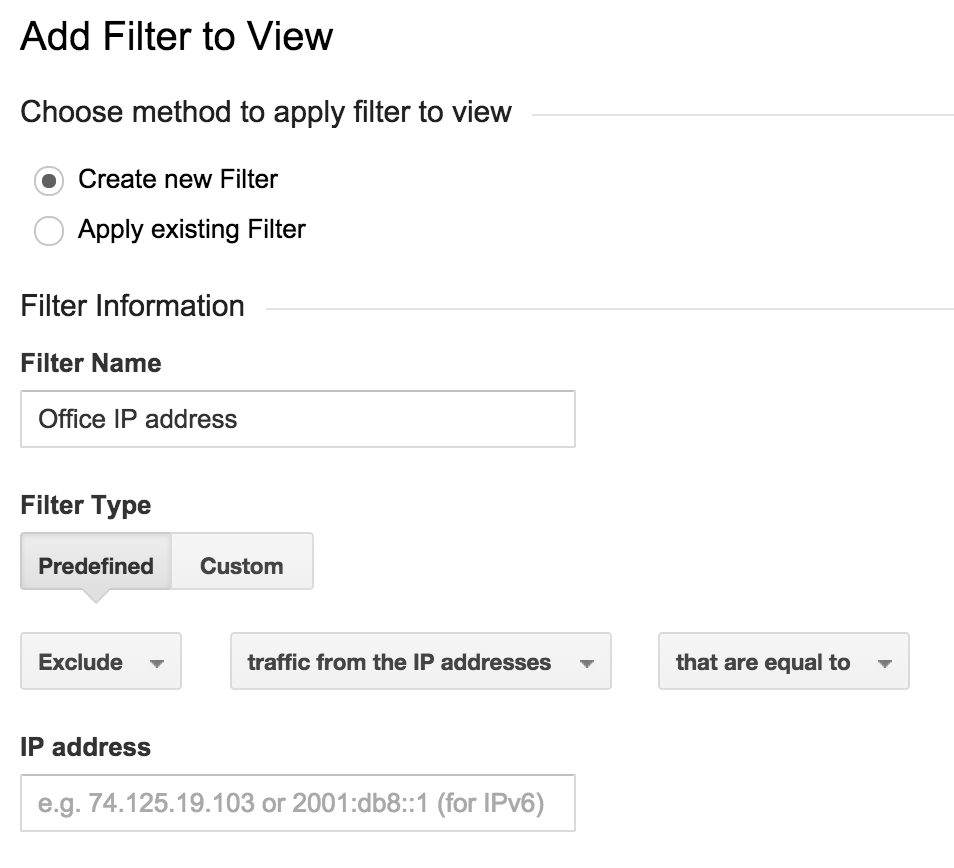
Now you’re going to create your filter:
- Keep “Create new Filter” checked.
- Name your filter with something descriptive. (e.g. “Office IP address”)
- Keep filter type on “Predefined.”
- Change “Select filter type” to “Exclude.”
- Change “Select source or destination” to “traffic from the IP addresses.”
- Change “Select expression” to “that are equal to.”
- Paste your IP address in the box.
- Click “Save.”
A few things to keep in mind
- Your IP address will now be blocked going forward. Your filter will not affect your traffic from the past.
- You’ll need to create a new filter for every location you visit your website from, not every computer. For example, if you block the IP address from your office building, it will effectively eliminate all traffic from the employees in your office, as well. (Note: larger office buildings/office parks may want to double check this by viewing WhatIsMyIP.com on several machines.) This means you will need to block your office and home IPs separately.
- If you often work from different places like Internet Cafes or coffee houses like I do, you can also add these IP addresses to your filters.
It’s as easy as that! You’re now on your way to tracking less skewed web traffic!