
The 30-Minute Keyword Research Blueprint for Service Businesses

If you’re running a service-based business – think consulting, design, legal help, pet grooming, or local home services – you know the right keyword strategy isn’t just about traffic: it’s about reaching the right customers with intent.
That’s why this 30-minute blueprint, using 100% free tools and designed to work for any service business, is essential to your marketing toolkit. Ready? Let’s go.

Why does this blueprint work?
▹ Free, powerful tools: Google Search Console (GSC) and People Also Ask (PAA) tools provide real data without any cost.
▹ Intent-focused: You’ll prioritize keywords that align with why people search – your service is the answer.
▹ Balanced strategy: We consider intent, difficulty, and opportunity to double down where it matters most.
▹ Quick & actionable: If you’re short on time, this delivers in just 30 minutes.
STEP 1 (10 MINUTES): HARVEST REAL, RANKED KEYWORDS FROM SEARCH CONSOLE
1. Open Google Search Console and go to Performance > Search Results.
2. Click the “Queries” tab and view all search terms that are driving impressions and clicks to your site.
3. Sort your list to identify:
▹ High-impression, but low-click queries – great opportunity for improving titles or meta descriptions.
▹ Queries ranking on page 2 or 3 (positions 11–30) – ripe for content optimization to push them to page one.
4. Export the data to a spreadsheet. This is your seed list of real, relevant keywords.
Why it matters: these are keywords Google already connects with your business – optimizing them leverages proven authority.
STEP 2 (5 MINUTES): RUN TOP KEYWORDS THROUGH A FREE KEYWORD RESEARCH TOOL
1. Go to the Ubersuggest keyword research tool.
2. Enter the 3 top/most relevant finds from your GSC account.
3. Grab data about search volume, SEO difficulty, and even paid difficulty.
STEP 3 (5 MINUTES): EXPAND WITH “PEOPLE ALSO ASK” QUESTIONS
1. Pick a few seed topics or existing keywords from your spreadsheet.
2. Google them to see the People Also Ask/Search For section.
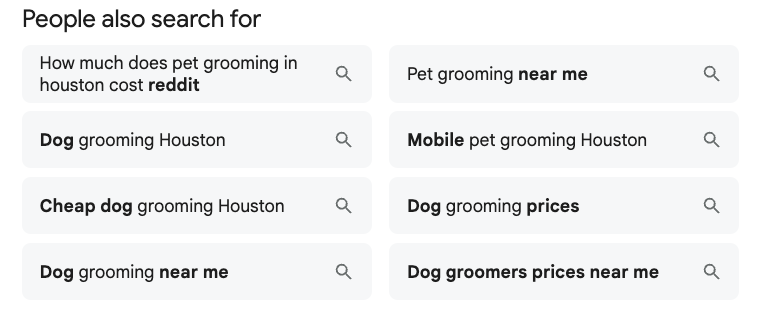
3. Collect question-based queries; for example:
▹ “How much does pet grooming in Houston cost?”
▹ “What to expect during a home energy audit?”
4. Paste these into your spreadsheet, labeled as potential content ideas.
Why it matters: People Also Ask reveals real user intent and questions you can answer directly, positioning you better in SERPs.
STEP 4 (5 MINUTES): EVALUATE INTENT, DIFFICULTY & OPPORTUNITY
In your spreadsheet, add three simple columns:
▹ Intent: Can this keyword lead to hiring your service? Label as Top, Mid, Info.
▹ Difficulty: Use your Ubersuggest data to input your keyword difficulty – Low, Medium, High – based on how buried or competitive the topic appears.
▹ Opportunity: Combine impressions + ranking position to flag high potential. Mark “+” for high opportunity.
Example
| Keyword | Intent | Difficulty | Opportunity |
| Houston wedding photographer | Top | Medium | High |
| How much does wedding photography cost | Info | Low | Medium |
Why it matters: It helps you focus on high-value actions – where you can rank and convert.
STEP 5 (5 MINUTES): CLUSTER KEYWORDS FOR CONTENT PLANNING
Follow the example keyword clustering spreadsheet. In it, you’ll find columns for:
▹ Cluster Name: The main theme.
▹ Seed Keywords: High-intent terms.
▹ Supporting Questions: People Also Ask entries.
▹ Content Type: Page, blog post, FAQ section.
Group related terms under common service themes. A quick glance helps you plan pages and sections effortlessly.
Why clustering matters: It ensures coherence in your content, avoids cannibalization, and maximizes collective ranking power.
STEP 6 (10 MINUTES): ACTION PLAN
Now that your keyword clusters are ready:
1. Prioritize clusters by opportunity and intent.
2. Create or optimize content:
▹ For high-opportunity keywords already ranking page 2, update title tags, intros, and add relevant FAQs.
▹ Use People Also Ask questions as headings or FAQ sections to capture featured snippets.
▹ Do regular searches on Ubersuggest (3 per day for free) and gain more knowledge about your top keywords.
3. Track results over time via GSC – impressions, CTR, average position for your target keywords.
4. Repeat quarterly to maintain momentum and chase fresh opportunities.
In just 30 minutes, you can build a targeted keyword map that:
Uses real performance data from GSC.
▹ Expands with actual user questions via PAA tools.
▹ Filters by intent, difficulty, and opportunity.
▹ Organizes topics into actionable clusters.
For a service business, this method keeps you focused on what matters: answering real customer needs and creating content that gets discovered – without paid tools or guesswork.
If you need help customizing the template or interpreting data, I’m happy to help. Let’s get your services in front of the right customers – fast.
ready for more?
We’ve got you covered…and we’ll keep it simple.
Every week, we’ll pop in your inbox with awesome SEO and blogging tips made easy.