
How to Share Your GA4 Data with Other Users

You already know how powerful Google Analytics 4 is for your website traffic and data.
But what if you need to share that data with your team or others? That vital data can help you enhance your SEO presence, make smarter decisions on social media, and improve your website for the better.

How to Share Your GA4 Data with Other Users
Have no fear, sharing your data with other editors, marketers, or teammates is simple.
Go to Google Analytics and ensure you’re logged into the correct Google account.
GO TO YOUR DASHBOARD
Start by going to the dashboard you’d like to share. Then, navigate to the settings area (the ⚙️ icon in the lower left-hand corner).
CHOOSE ACCOUNT OR PROPERTY ACCESS
Depending on your account setup, you might want to give someone full account access (if you have multiple accounts to share) or simply property access (if you only want to share access to a single site).


ADD USERS
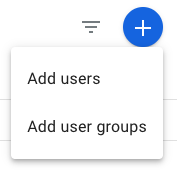
Choose the access management that makes sense for you and click the ➕ in the top right-hand corner to add a user. (In most cases, you’ll likely need to add a single user, not a user group.)
ENTER EMAIL ADDRESS(ES)
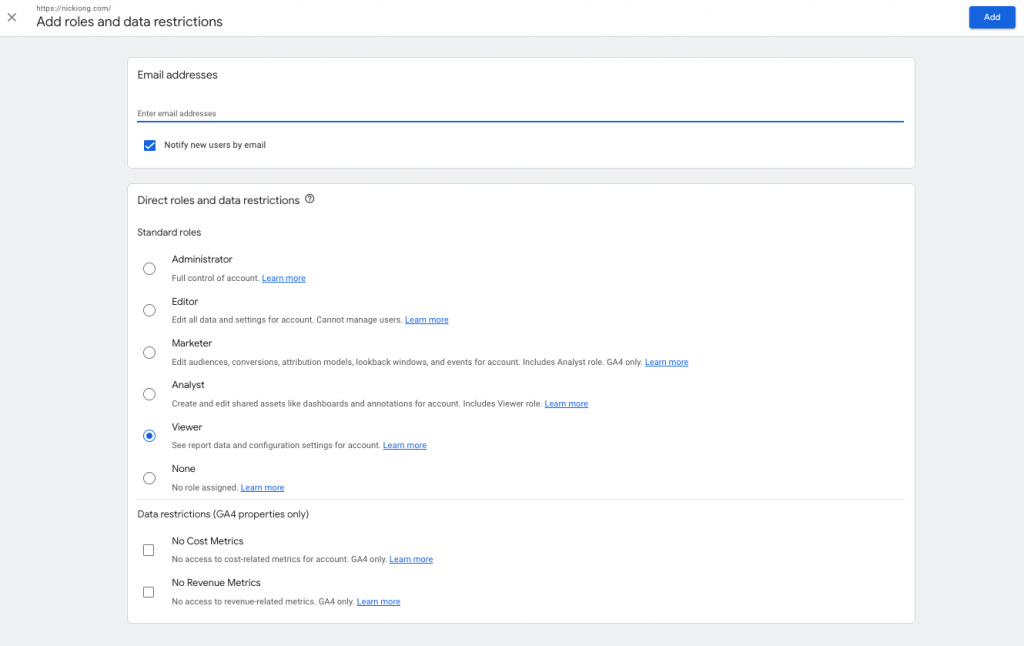
Enter the Google email address(es) and access level. You’ll see what each one can do below:
CLICK “ADD”
Click “add” and, by default, the new user will get an email with access to your GA4 account!
And there you have it! Now get to sharing your GA4 with everyone who needs it!
Start ranking higher in the search engines
If you need a little more help with SEO, this mini-course has your name on it. Walk through the checklist with me and learn how to check each item off the list in under 90 minutes!

ready for more?
We’ve got you covered…and we’ll keep it simple.
Every week, we’ll pop in your inbox with awesome SEO and blogging tips made easy.